AE ENHANCERS

Expressions/Scripts/Presets
It is currently Sat May 18, 2013 5:09 pm

All times are UTC - 8 hours [ DST ]


Post new topic Reply to topic  [ 6 posts ] 
Author Message
 Post subject: Create Linked Effects
PostPosted: Sun Jun 13, 2004 5:07 pm 
Offline

Joined: Sat Jun 05, 2004 7:59 am
Posts: 645
Location: London, UK
This script takes the currently selected effects and creates new versions
that are linked to the original 'master' effects using expressions.

Copy/paste these new 'linked' effects around your project, then when you
change a value on one of the master effects, that value will also change
on all linked versions in the project.

Download CreateLinkedEffects_v1.2.zip

Note: This script requires After Effects 6.5 or later.

--------------
How it works :

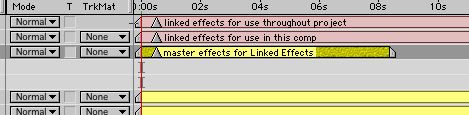
1/Select an effect on a layer in TLW or the ECW

Image


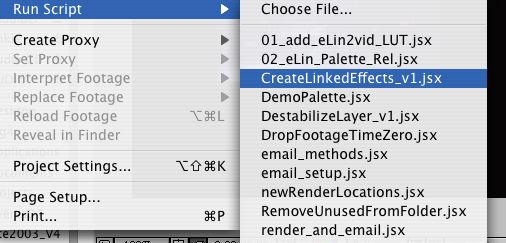
2/Apply the script

Image

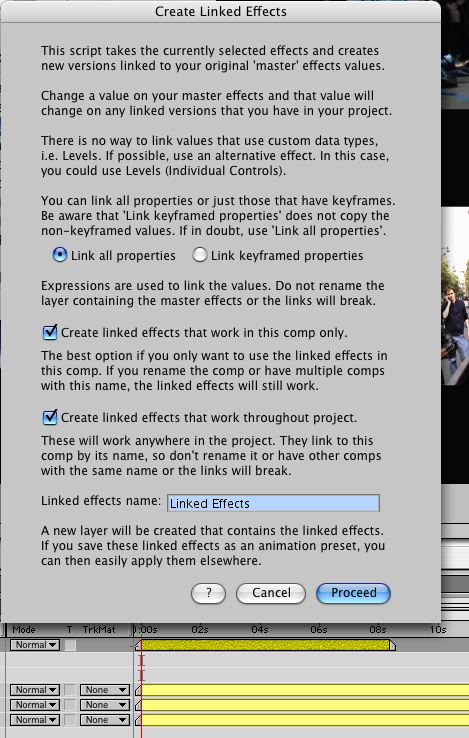
3/The dialog box to select your options (in this case I left it at the default settings)
Image


4/The result in the TLW

Image

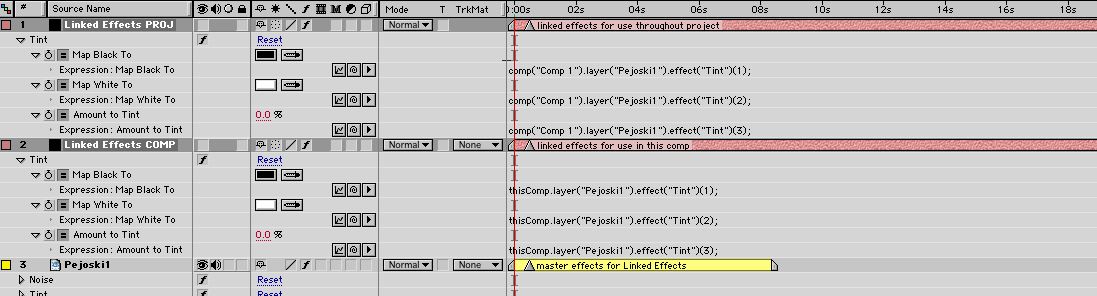
5/And the expressions that were created. Now you can copy the linked effects and paste them wherever needed.
Image


Top
 Profile  
 
 Post subject:
PostPosted: Sat May 13, 2006 5:43 pm 
Offline

Joined: Sat Jun 05, 2004 7:59 am
Posts: 645
Location: London, UK
I've posted a v1.2 update to this script which fixes the layout of the main dialog box on AE7 (well on the Mac at least).


Top
 Profile  
 
 Post subject:
PostPosted: Tue May 22, 2007 2:13 am 
Offline

Joined: Tue May 22, 2007 12:34 am
Posts: 2
Many thanks for this script!

Just what I needed today, as luck would have it.


Top
 Profile  
 
 Post subject: Similar Problem
PostPosted: Mon Dec 10, 2007 6:03 am 
Offline

Joined: Mon Dec 10, 2007 4:54 am
Posts: 2
hello, came to this page via a link posted on a question i made @ cgtalk. It seems really interesting but can this apply to link transformation (orientation, position & opacity) bettween 3D layers? my problem was that i wanted to link a 3D layer to a pre-comp that also consisted of layers moving in 3D space. How can i do that? have u got any clue? my original post was on this link

http://forums.cgsociety.org/showthread. ... ost4825649

thanx


Top
 Profile  
 
 Post subject:
PostPosted: Mon Dec 10, 2007 7:04 am 
Offline

Joined: Sat Jun 05, 2004 7:59 am
Posts: 645
Location: London, UK
This script won't do that, but it's easy enough to do using the expression pickwhip.

Drag the precomp's timeline tab out into another panel, so you can see both timelines at the same time. Then twirl open the layer properties, so the ones you want to link are visible. Add an expression to each property in your main comp and drag the expression pickwhip to the property you want to link it to in the precomp. You should end up with expressions that look something like:
Code:
comp("Precomp").layer("precomp_layer").transform.position;


Top
 Profile  
 
 Post subject:
PostPosted: Mon Dec 10, 2007 10:04 am 
Offline

Joined: Mon Dec 10, 2007 4:54 am
Posts: 2
It works just fine the way you described it! Thanx soooo much, you got me out of a lot of pain trying to do all that manually..I didnt know that u could open more than one timeline at the same time..it made sence once u said! thanx again.. :D


Top
 Profile  
 
Display posts from previous:  Sort by  
Post new topic Reply to topic  [ 6 posts ] 

All times are UTC - 8 hours [ DST ]


Who is online

Users browsing this forum: No registered users and 0 guests


You cannot post new topics in this forum
You cannot reply to topics in this forum
You cannot edit your posts in this forum
You cannot delete your posts in this forum
You cannot post attachments in this forum

Search for:
Jump to:  
Powered by phpBB © 2000, 2002, 2005, 2007 phpBB Group